Product

Still collecting data on a PC?
Drive. Tap. Done.
Your next corridor study deserves a phone, not a PC. One app records every run from the cup-holder. One cloud workbench turns those runs into a stamp-grade before/after report - reliability, arrival types, significance, dollars. No GPS box. No USB import. No desktop software to install.
Full feature set · iPhone and Android
Every number on the report traces to a published method.
FHWA Reliability
PTI · BTI · LOTTR
HCM Arrival Type
Platoon quality, signal by signal
USDOT Value of Time
Delay priced per federal guidance
EPA Social Cost of Carbon
CO₂ priced per ton
CalTrans ICF Defaults
Published fallback cost factors

What you get
Five reasons the study gets easier - and harder to argue with.
Field
Retire the GPS box and the distraction.
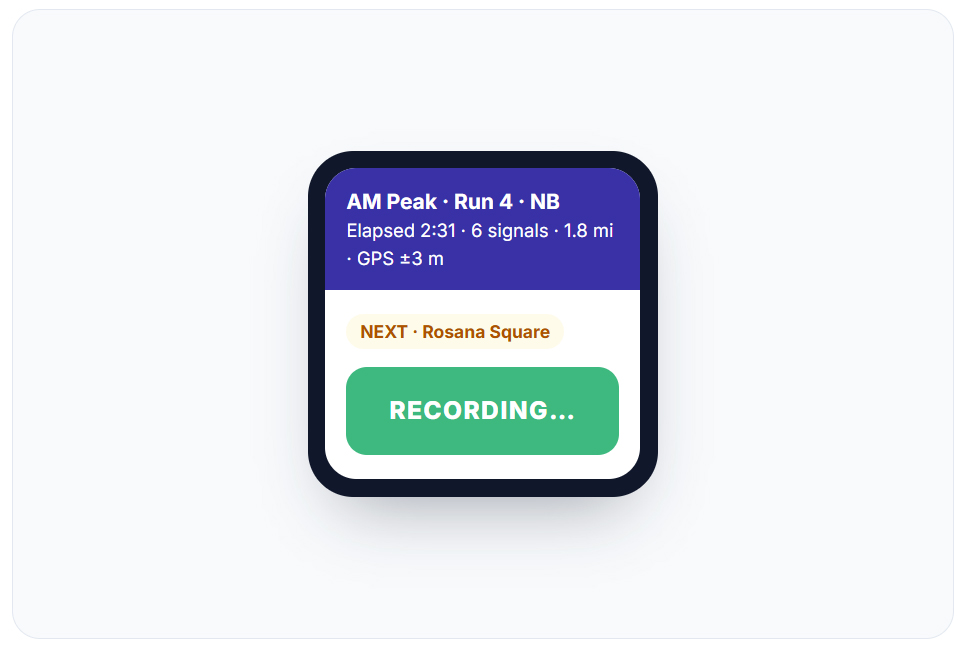
For a safer drive, the phone in your cup holder replaces the dedicated GPS unit, the Windows laptop, and the install-update-import routine. Press START once before you pull away, and ArterialPulse handles the rest - counting signals, tracking distance and GPS accuracy, keeping the screen awake, and automatically starting the return run when you U-turn. New corridor? No pre-configuration required. Quick Collect records immediately and saves the run as a permanent NB/SB pair. Hands on the wheel. Eyes on the road.
Sync
Your runs beat you back to the office.
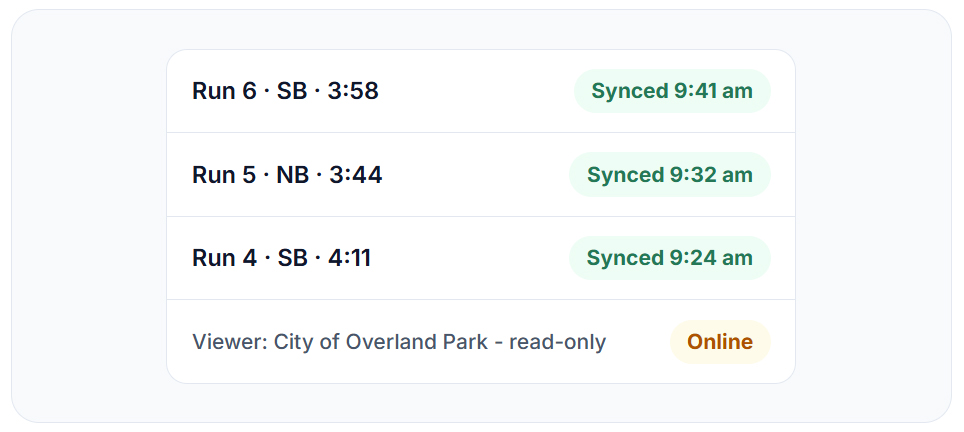
PC-based alternatives park your data on one machine until somebody plugs it in. ArterialPulse stores every run on the phone, offline-first, then syncs the moment you have signal - the desk engineer watches runs land in real time, from any browser, on any OS. A tappable sync badge shows the audit trail and retries on demand; nothing is silently lost. One study, many engineers, role-based access, and a read-only login for your client. Nobody ever emails a file named final_v3_REAL.zip again.
Validation
Bad runs get caught, not averaged.
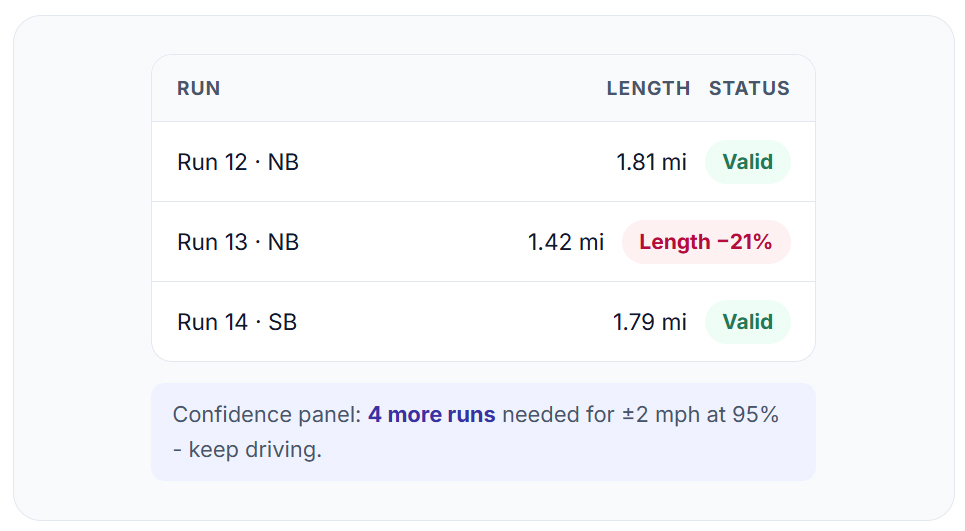
A detour or a missed start quietly poisons a mean - and a desktop workflow won’t tell you. The length validator flags every run that didn’t drive the full corridor (±10% tolerance); on our first production backfill it caught 28 of 54. And before you demobilize, the confidence panel shows the sample size you still need at ±1, ±2, ±3 mph - so you find out you need four more runs while you’re still in the car, not next Tuesday.
Defensibility
Numbers your reviewer already trusts.
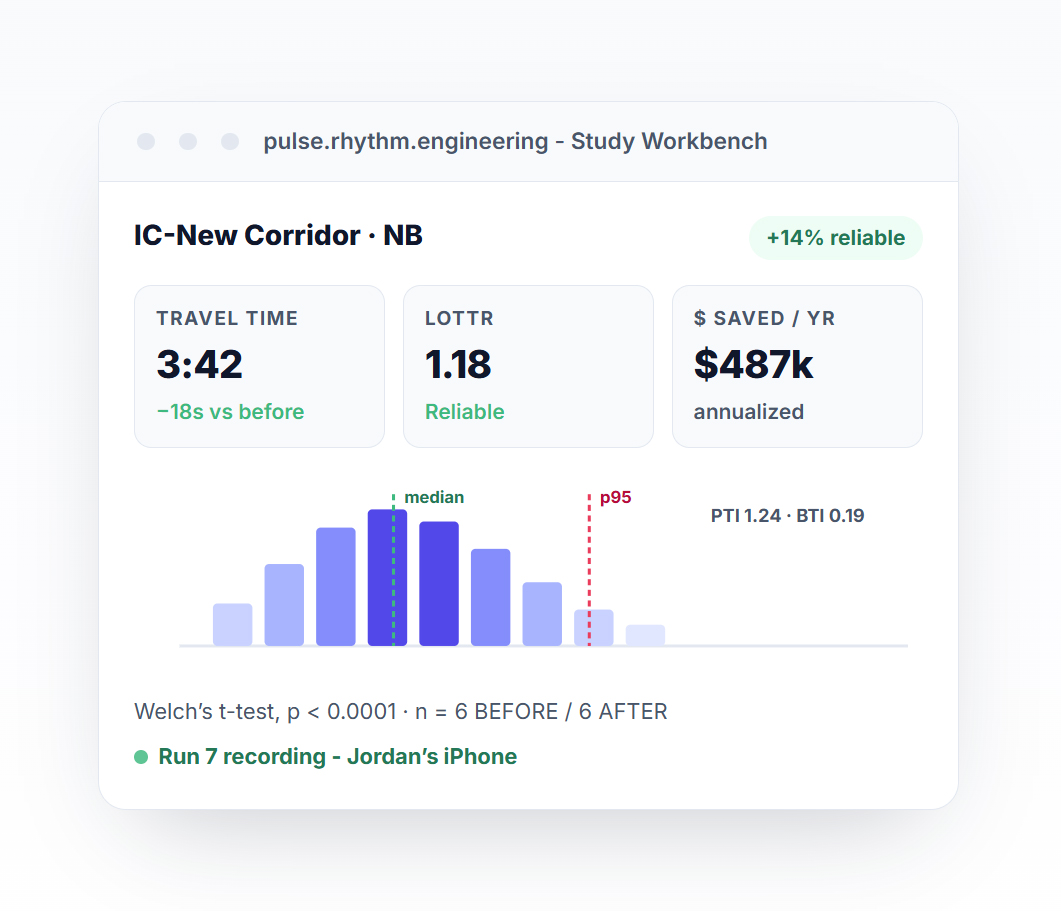
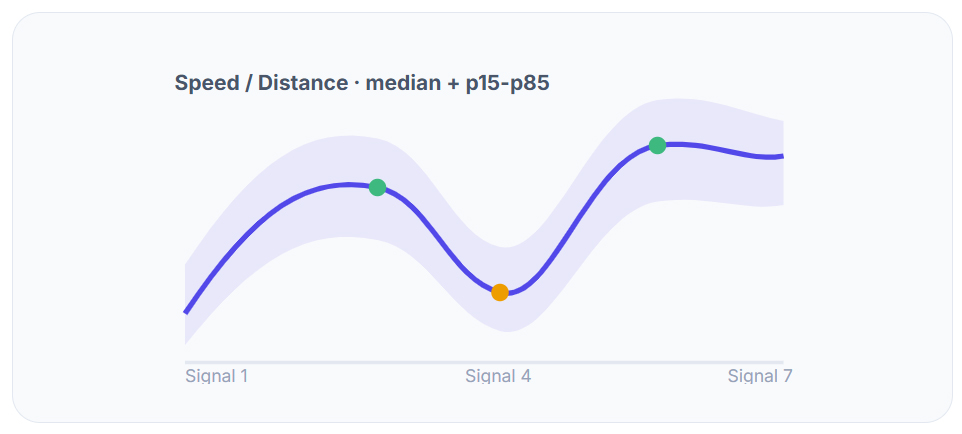
PTI, BTI, LOTTR per FHWA. Arrival Type per HCM, signal by signal. A Time-Space Diagram and Speed/Distance plot with median and percentile bands, a Delay Breakdown split into cruise, accel-decel, and stopped time, and a before/after delta with a t-test p-value. The same speed-band colors engineers have read on arterial studies for twenty years. Nothing proprietary to defend in review - every metric cites its chapter, so your report survives the one meeting that matters.
The money slide
Dollars, not just delay.
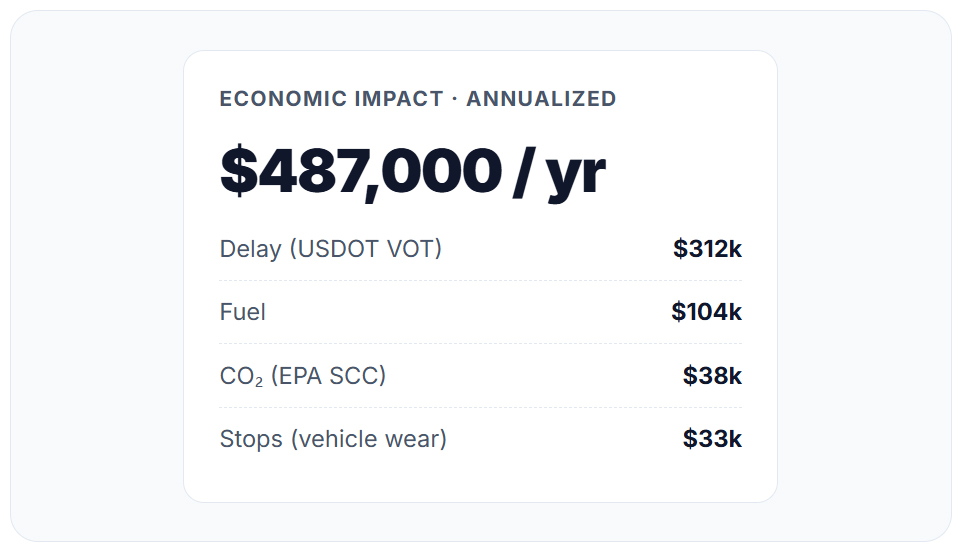
Delay becomes USDOT value-of-time dollars. Fuel becomes pump price. CO₂ becomes EPA social cost. Stops become vehicle wear. Annualized on your daily-volume input and exported as a branded PDF, a multi-sheet Excel, or four CSV variants - engineer, client, and prepared-by on the cover - because “$487,000 a year” gets a retiming program funded, and “18 seconds saved” does not.
Plumbing
The boring stuff that saves the study.
Underneath the charts: the engineering that keeps a study defensible six months later.
Three-phase pipeline on every sync - segment analysis, time-period classification, length validation, each in its own transaction.
JWT auth, role-based access, multi-tenant org separation - with a timestamped, attributed audit trail.
Soft deletes and bidirectional dirty tracking - nothing is silently lost, ever.
UTDF timing-plan upload with effective-date matching - before/after studies pick the right plan automatically.
The desktop era is over
Still running corridor studies through a PC?
Same study. Same reviewer. None of the hardware, imports, or guesswork.
Already buying network probe data? Keep it. The feed finds the slow corridor. ArterialPulse tells you why it’s slow - which signal, which arrival type - and what fixing it is worth per year.
The Proof
Field-tested where it hurts: production data.
“Your quote here.”
Testimonial slot - the first cohort’s case-study quote lands in this card.
38 of 47
runs auto-classified into the correct peak period, org-wide, in one pass.
5
published methodologies - FHWA, HCM, USDOT, EPA, CalTrans - behind every number on the report.
“Your corridor here.”
We’re collecting first-cohort case studies now. Run one on your corridor free for 30 days and we’ll do the write-up.
“Your before/after here.”
Ship a study in your trial month and we’ll feature it - with your firm’s name on the PDF, not ours.

Who’s behind this
Built by traffic engineers, not a software vendor.
“We’ve spent our careers making signals move traffic - and got tired of proving it with a GPS box, a Windows laptop, and a weekend of spreadsheet cleanup. So we built the study tool we wanted in our own cars. Drive it on your corridor and see.”
Reggie Chandra, Ph.D., PE · Lead Traffic Engineer & CEO, Rhythm Engineering
Pricing
$3,500 per seat, one-time
then $1,000 / seat / year starting year 2
Unlimited corridors, unlimited studies
iOS + Android apps, cloud workbench, branded PDF exports
Hosting, updates, and support included
State DOT or county that can’t pay by card? Buy by PO - quote, SOW, and routing instructions within one business day.

Drive the corridor. We’ll do the math.
30 days free · Full feature set · No credit card · iPhone and Android
Prefer a walkthrough? Book a 20-minute demo →